.png?width=189&height=28&name=Multihub%20Logo%20Color%20(1).png)
Overview
Every VibeSites property or landing page hosted through MultiHub needs one or more DNS records at your DNS provider so your custom domain points to — or forwards to — the site that serves your VibeSite.
Depending on what the domain is for, you'll add one of the following:
- A domain that serves the site (e.g. www.yourdomain.com is the VibeSite): a CNAME record for www, plus an A record for the root domain so yourdomain.com forwards to www.
- A landing page (e.g. rentnow.yourdomain.com): a single CNAME record for rentnow.
- A domain that redirects to the site (an alternate/vanity domain that should forward to your main site): A records for the root and www.
This guide walks you through it end to end: creating custom domains in MultiHub, adding the records at your DNS provider, and confirming everything is working.
What You'll Need
- Admin or edit access to your DNS provider account (where the property domain is registered)
- Access to MultiHub, or an exported DNS records spreadsheet from your Repli team
Step 1 - Create Custom Domains in MultiHub
If you already have a DNS records list or your domains are already set up in MultiHub, skip to Step 2.
Option A - Manage domains at the company level (recommended for bulk setup)
- In MultiHub, open the VibeSites workspace and navigate to the Domains tab (Company VibeSite Domains page).
- In the Domains column for any property, click Add Domain.
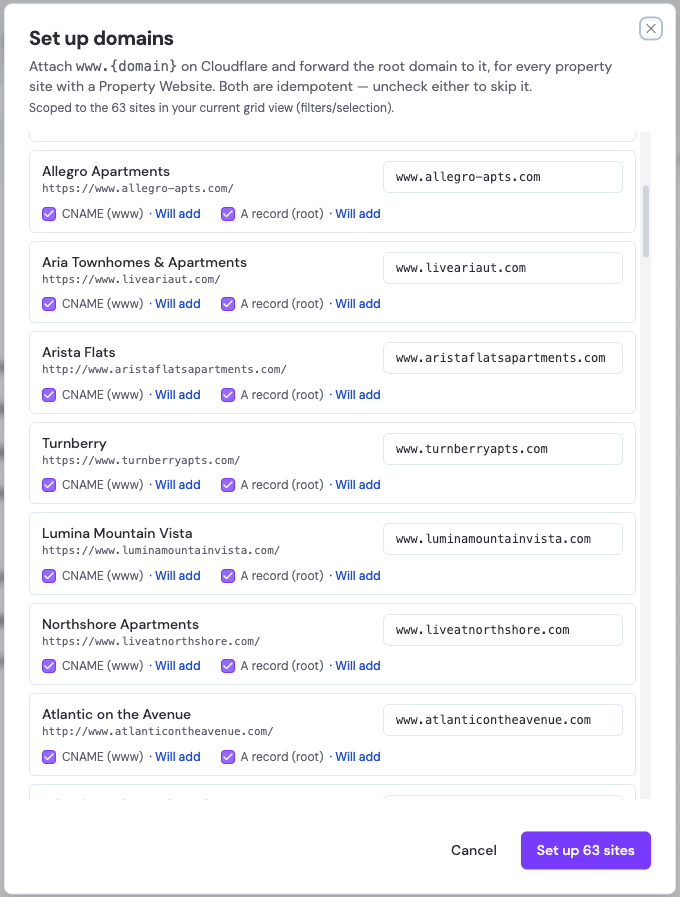
- For setting up many sites at once, use the Actions dropdown, then Set up domains.
- This adds the www domain and the root-domain redirect for every property site that has a Property Website on file, then shows you a summary to review before you apply it. Each site's www. domain is filled in from its Property Website. You can run it as often as you like — it only adds what's missing and never creates duplicates — and you can skip the CNAME or the A record for any site. It only sets up the sites you're currently viewing, so if you've filtered the list (for example, by rollout phase) or selected specific rows, it uses just those.
Option B - Manage domains one property at a time
- Open the property in MultiHub and navigate to VibeSites, then Domains (Property VibeSite Domains page).
- Click + Add Domain in the Custom Domains section.
When the Add Custom Domain dialog opens
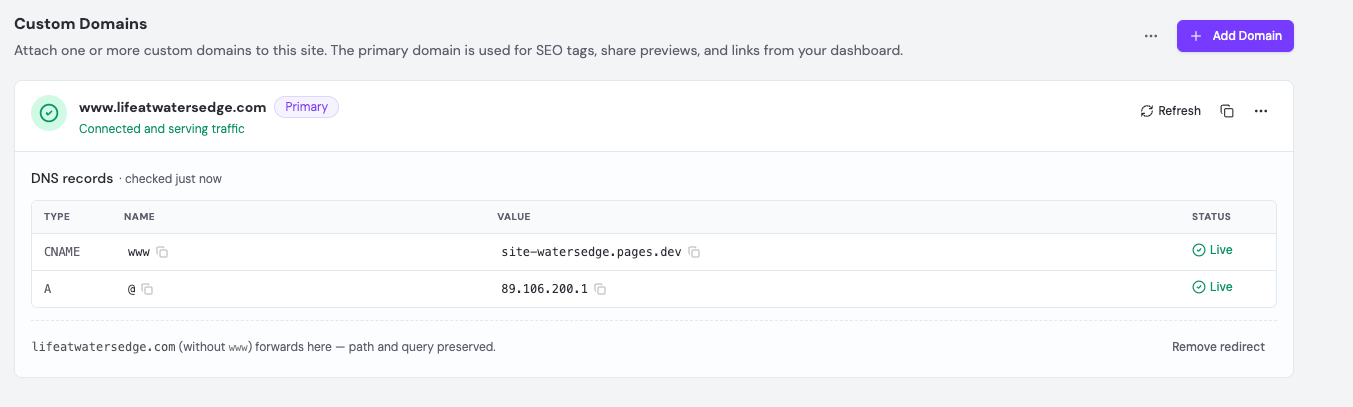
- Choose whether the domain serves this site (the site loads on it) or redirects here (an alternate domain that forwards to your primary site).
- For a domain that serves the site, MultiHub auto-suggests a www. prefix for property websites or rentnow. for landing pages, based on the site type.
- The suggested domain uses the property website already on file in MultiHub. If it's wrong, type the correct hostname in the input, or click the pencil icon next to the property URL to update it in MultiHub.
- A served domain will be set as the primary domain for the site (you can change this later). Redirect domains are never primary — they point at the primary.
- Click Add Domain.
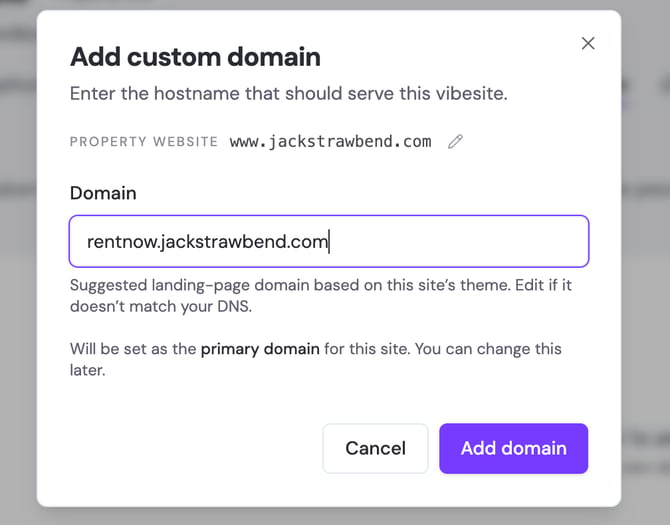
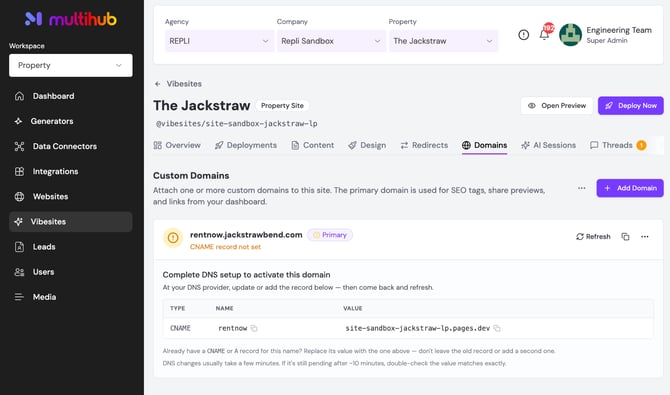
Once added, MultiHub shows the domain with a status and the exact DNS record(s) you need to enter at your DNS provider.
Setting up the root domain (Optional, for served domains)
A www domain has a Root domain section on its card with a Set up redirect action. This makes the root domain (yourdomain.com, with no www) forward to www.yourdomain.com, keeping the visitor's path and query string.
- MultiHub first checks how your root domain's DNS is managed.
- If it's managed somewhere other than our platform, you'll get an A record to add at your DNS provider (the root domain can't use a CNAME — that's a DNS rule).
- If it's already managed on our platform, the redirect is handled for you and there's nothing to add — the card tells you so.
Redirecting an alternate domain to your site
-
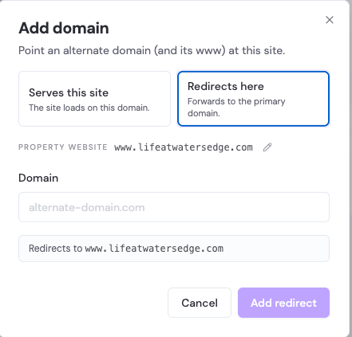
To forward a different domain (a vanity or legacy domain) to your main site, click Add Domain, choose Redirects here, and enter the alternate domain.
-
MultiHub shows where it will forward (your primary domain) and gives you two A records to set at the alternate domain's DNS — one for the root and one for www — so the whole domain forwards to your site.
-
Optional - Export the full DNS list for your IT team
-
From the Company VibeSite Domains page, click the Actions dropdown, then Export DNS Records.
-
This gives you a spreadsheet — one row per record, including both CNAME and A records — that you can hand off to whoever manages DNS. The export includes the sites you're currently viewing, so if you've filtered or selected rows, it exports just those — for example, one rollout phase at a time.
-
Step 2 - Add the CNAME Record at Your DNS Provider
Using either the exported spreadsheet or the values shown in MultiHub, add the record(s) for each domain.
Important: Make sure there is only one record for a given Name (rentnow, www, or @) per domain. Duplicate records are the most common cause of misconfiguration.
CNAME record (for www or rentnow):
Field |
What to Enter |
| Type | Select CNAME from the dropdown |
| Name | rentnow (landing page) or www (property website) |
| Value | Paste the value from MultiHub or the CSV (e.g. site-acacia-park-apts.pages.dev) - do not include https:// |
| TTL | Leave as default (1 Hour) |
A record (for the root domain and for redirects):
Field |
What to Enter |
| Type | Select A from the dropdown |
| Name | @ for the root domain, or www (some providers leave Name blank for the root) |
| Value | Paste the IP address shown in MultiHub or the CSV — copy it exactly |
| TTL | Leave as default (1 Hour) |
You may see two A records for a redirect domain (@ and www), both pointing at the same IP. That's expected — the whole domain forwards.
-
Why use an A record instead of a CNAME for the root domain? DNS doesn't allow a CNAME on a root domain, so the root uses an A record that points at a fixed IP. Redirect domains use A records for www as well, because the forwarding target is a stable IP — pointing straight at it is simpler and avoids the CNAME limitation entirely. Always use the exact Type / Name / Value shown for each row in MultiHub.
Click Save.
Step 3 - Verify at Your DNS Provider and Move to the Next Domain
- Confirm the new record (CNAME or A, depending on your domain type) appears in your DNS records list with the correct Name and Value.
- Repeat Step 2 for each remaining property.
Example
For the domain acaciaparkapartmentselpaso.com, the CNAME record looks like:
Type |
Name |
Value |
| CNAME | rentnow | site-acacia-park-apts.pages.dev |
This makes rentnow.acaciaparkapartmentselpaso.com resolve to the Cloudflare Pages site serving your VibeSite.
For a property website on yourdomain.com, you'd set both:
Type |
Name |
Value |
| CNAME | www | site-your-site.pages.dev |
| A | @ | (the IP shown in MultiHub) |
This serves the site on www.yourdomain.com and forwards yourdomain.com to it.
Step 4 - Verify in MultiHub
- Return to the Company or Property VibeSite Domains page in MultiHub.
- Click the Refresh button to check whether it's taken effect yet.
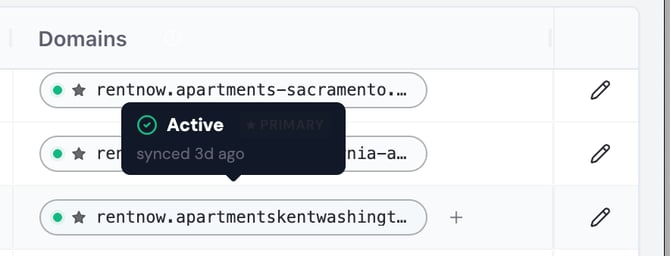
- When the domain status shows Active / Connected & Secured (green), the record is correctly set and traffic is being served, or forwarded, to your VibeSite.
Status is shown per domain, so a site's www can be live while its root redirect is still verifying. The "N sites need attention" badge on the company page counts sites with a missing or not-yet-verified domain.
DNS changes usually take effect within minutes to an hour, but can take up to 48 hours to propagate fully across the internet. Keep checking the domain status in MultiHub. If the domain still hasn't turned Active after 48 hours, contact your Repli team for assistance. If you'd like to verify propagation independently, a tool like dnschecker.org lets you check how your DNS records appear from multiple global locations.
Troubleshooting
-
“Can’t edit” or “Can’t delete” on existing records: This is normal for locked A records and NS records managed by your registrar. You don’t need to touch those — just add the new CNAME (or A) record alongside them.
-
A rentnow or www CNAME already exists: Confirm the existing record value matches what MultiHub shows (e.g., site-acacia-park-apts.pages.dev). If it doesn't, update the existing record to match.
-
Error saving the record: Some DNS providers may behave inconsistently or time out during saves. Wait a moment and try again. If the error persists after refreshing the page, contact your Repli team for assistance.