.png?width=189&height=28&name=Multihub%20Logo%20Color%20(1).png)
You manage FAQs on your VibeSite through the FAQs Collection in your MultiHub property dashboard — a fully custom collection you build and manage yourself, not pulled from a connected data source. Adding, editing, or removing FAQs in that collection and then redeploying your site updates what prospective residents see.
Accessing the FAQs collection
In MultiHub, go to your Property → Dashboard, find the FAQs section, and click Edit.
Note: If you do not see the FAQs section on your VibeSite, confirm that the FAQ widget is enabled in your site layout settings.
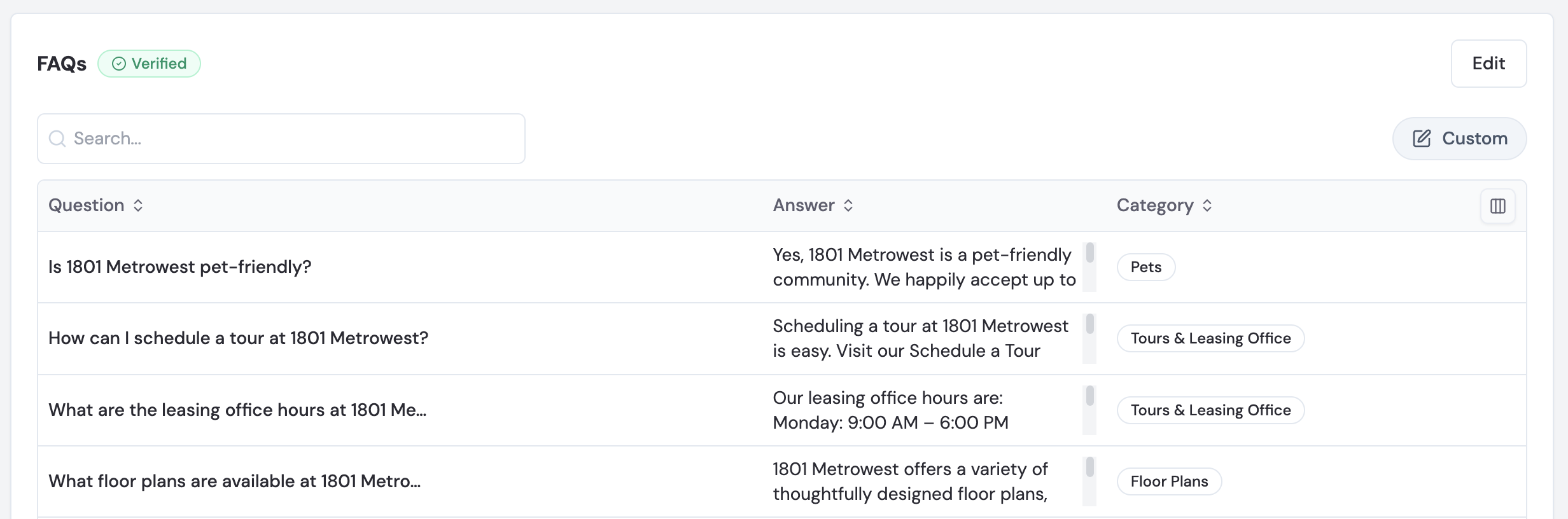
Adding an FAQ
- Click Edit to customize the FAQ Collection
- Click + Add to add a new FAQ.
- Enter the following:
- Question
- Answer
- Category (optional) — e.g., Leasing, Pets, Amenities
- Tip: There is no hard character limit enforced, but keeping questions under 100 characters and answers under 500 characters ensures the best display on your VibeSite.
- Click Save when done.
Editing or removing an FAQ
- Click the three dots (...) to the right of any FAQ in the list.
- Select Edit to update the question, answer, or category — or Delete to remove it.
Pushing changes live
After saving your FAQ changes in MultiHub, redeploy your VibeSite to push them live. Changes may take a few minutes to appear after deployment. See How to Deploy Site Changes for full instructions.